In-depth Guide
The Today System is a productivity system designed around the simplest of tools: a 3 x 5 index card. It starts as a simple task list, but becomes a whole lot more.
It’s designed to focus only on what you can do today to move you toward where you want to be, and it builds out from there. It does four simple but important things:
- Sustains your focus on the important things to do today
- Acts as a physical source of motivation throughout the day
- Establishes a productivity measurement based on what’s important to you
- Helps you prioritize each day and represent those priorities tangibly
There are four levels, and you can stay at any one of them as long as you like.
Level 1: The Today Card
In its simplest form, the system centers on filling out an index card — the Today Card — each day:
- Assemble a list of your (at most) nine most important items to do today.
- Assign a possible points value to each based on its importance.
- Commit to doing only what’s on that card, unless something unforeseen and more important comes up.
- As you complete each item, cross it off and award yourself the points.
- At the end of the day, calculate your points and your effective batting average.
- Track your score each day: points actual divided by points possible. Shoot for a minimum .750.
Prep your card
Grab a lined 3x5 index card and make it look like this:
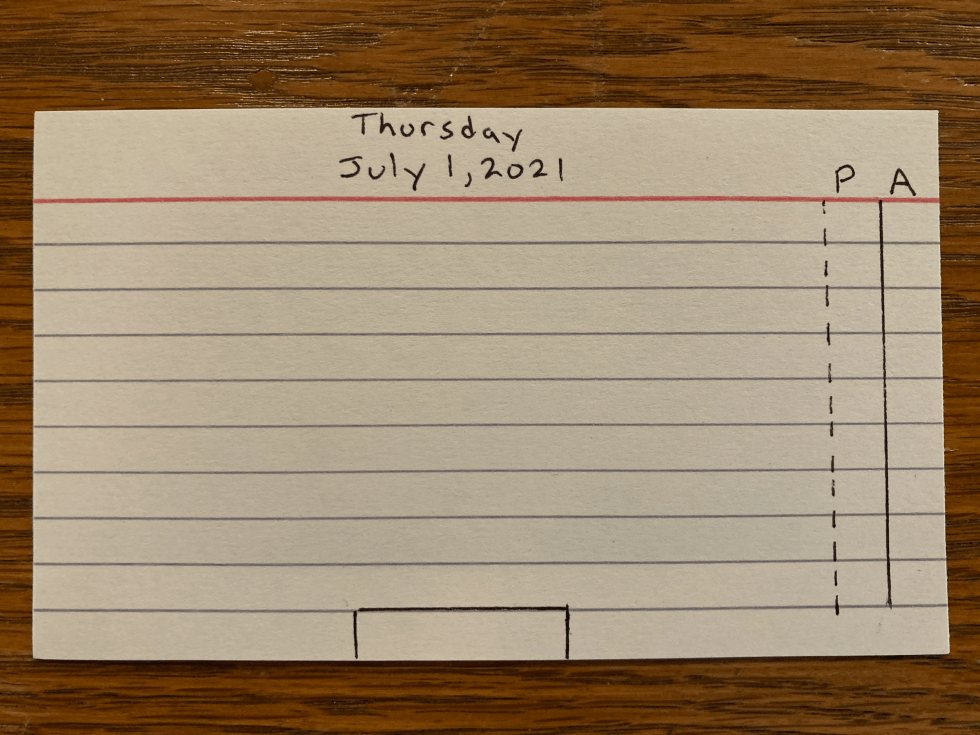
Use whatever date format you like, so long as you capture the day, date, and year — the year matters once you’ve been using this for a long time. The “P” and “A” columns on the far right should be only big enough for a single digit, and no bigger. You want as much space to their left as possible.
Populate your card with actions
Flip to the unlined side and spend five minutes listing the things you believe are important to get done today, in no particular order. By “important” I mean things that may not be urgent, but that move forward your most worthy goals.
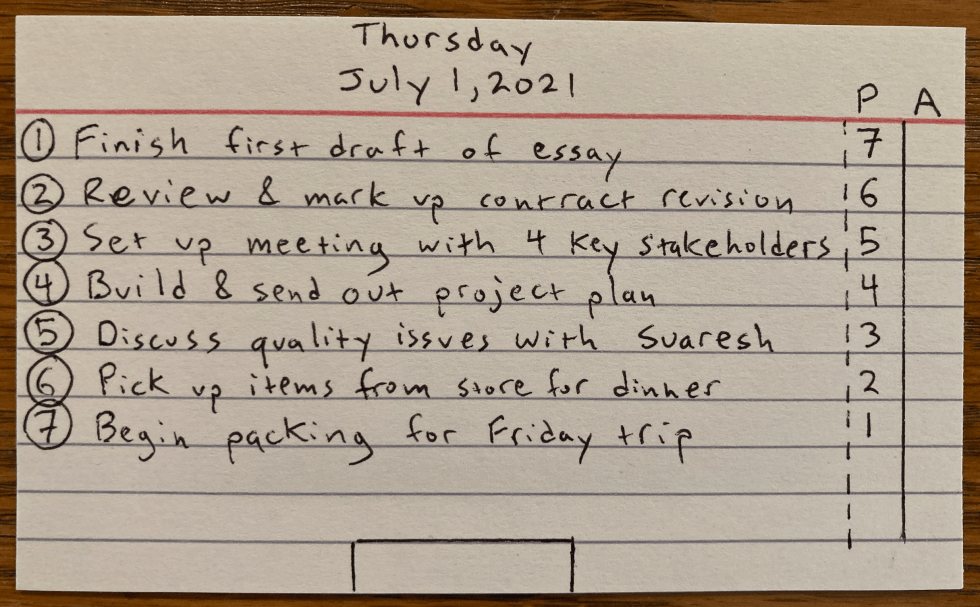
Then flip back. Put a “1” on the first line and write the most important task you can do today. Put a “2” on the next line for the task that, if you could only do two things today, would be right behind the first. Repeat for as many items as you deem important, one per line, up to nine.
Then place the number of the last item in the “P” column of the first item. If you have seven items, item 1 gets 7, item 2 gets 6, down to item 7, which gets 1.
Tips for filling out your card
Use the 1.25x rule. Look at your calendar first. If you’re in meetings, picking up kids, making dinner, and cleaning up for all but two hours today, consider a maximum of three items. No more than 1.25 items per hour of free time.
Favor push items over pull items. A push item is one you need to make happen. A pull item happens through habit or takes little effort — a meeting already on your calendar isn’t worth putting on the card. The exception is when you’re notoriously bad about making meetings.
Batching and time-blocking help. The lines are spaces you can fill with whatever you want to track. You can put a few related items on one line, or write “spend at least 45 min. on the big presentation” and get the points if you do it. That’s great for tasks where you’re not sure what the work really is, but know that progress matters.
Review and commit
Review the items in order. Take a deep breath in, and let it out slowly. Let it sink in that if you follow this card, you can feel really good about how your day went. You’ve made the hard decisions. Now you just need to do the work.
Using the scoring system
Why points at all?
The first card I ever made had six items on it, straight out of the Ivy Lee Method. But there was a problem: the order of the items alone wasn’t enough to push me to work on the top ones first. Perhaps it’s how I’m wired. Perhaps I’d been desensitized to lists.
Then I had an idea. What if I gave myself a score based on how well I tackled the items? What if that score was tabulated in a way that rewarded working on important, goal-related activities, and punished working on distractions? Could I train myself to be more focused with something like that?
As it turns out, I could.
How it works
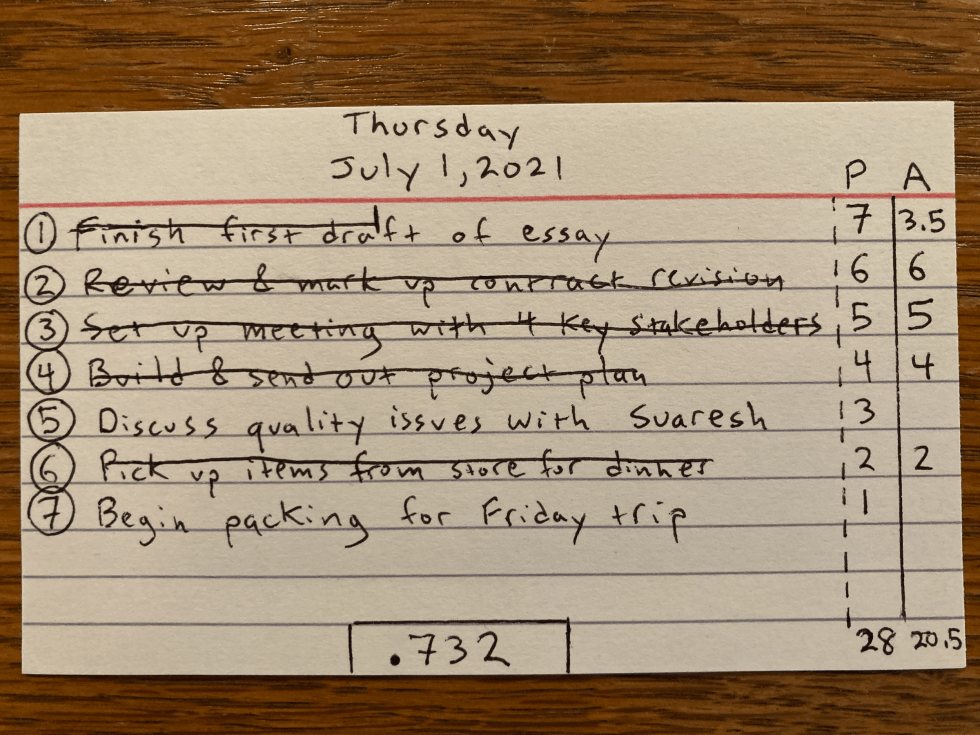
The “P” column is your possible points. The “A” column is your actual points. When you complete a task, cross it off and put the points earned in “A”.
If you made an honest effort but only got halfway, take half the value. If you had seven tasks and were working on task #1 (worth 7 points) without finishing, put 3.5 in the “A” column. This mitigates the all-or-nothing thinking that derails so much of our productivity efforts. It’s also a surprisingly effective way to get yourself moving: half credit instead of nothing is often enough to make you roll up your sleeves late in the day and make some progress, when the thought of finishing the whole thing would have stopped you cold.
Between them, the two halves of the card do two different jobs. The list keeps you calm — even in the whirling storm of emails, calls, and interruptions, it reminds you that all you have to do today is this stuff. The point system keeps you honest: if you choose to do other things that pop up, or entertain distractions, you don’t get points.
The end of the day
Add up your actual points and place that at the bottom of the “A” column. Divide by the total “P” points. Place that decimal — highest score being 1.000 — in the box at the center bottom. That’s your score for the day. It’s your win percentage. It tells you how well you did at the things you identified as most important.
A fully scored card at the day’s end looks like this:
Level 2: The Card + The S3
After Level 1, you’ll benefit from building a minimal system around the daily card: solidifying the morning habit, keeping track of potential items, and using your score to refine what goes on tomorrow’s card.
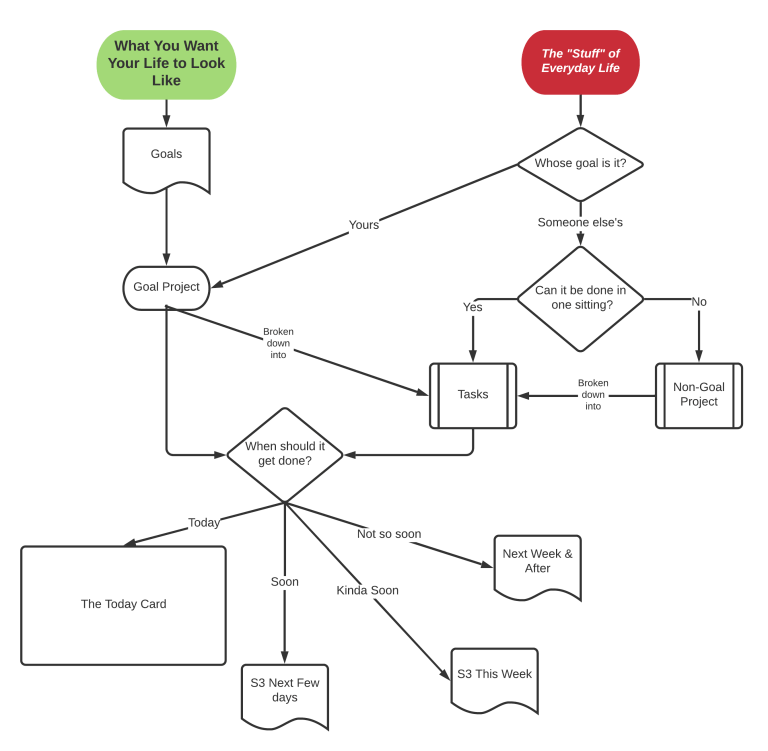
You could use a standard “next actions” list, unordered and with contexts. For me that proved too overwhelming. I needed a way to queue up what to work on first, next, and further down the line. So I built a Simplified Scheduling System, or S3 — a list of everything you want to get done, separated into four temporal categories:
- Today + — the items you deem most important to get done today, or tomorrow if you can’t finish them. This list feeds the card each day.
- Next Few Days — items that should get attention soon, moving up as items get onto the card and get completed.
- This Week — items for the next seven days, or the current week, however you define it.
- Next Week and After — a parking lot for things that need to be on your radar, but not yet.
If you don’t have a project list already, the S3 is simply where you dump things as you become aware of them. As you complete items, or as they become more important, move them up. As they become less important, move them down. Review it regularly and don’t let it go stale.
Level 3: The Card + The S3 + The Scorekeeping Sheet
The gamification of each day was a huge boon to my productivity. But after a while I became more interested in longer-term trends: how am I doing this week, how does that compare to last week, what’s my career score, and what can I learn from it?
So I created a spreadsheet with two tabs. The Daily Scores tab populates the week number, day, and date, and provides space for possible and actual points. It calculates the score for the day, with a column for notes about why I got the score I did. Up top, a formula calculates a running average — the sum of all points earned divided by all points possible. If I can get that lifetime score to .750 and keep it there, I consider that doing quite well.
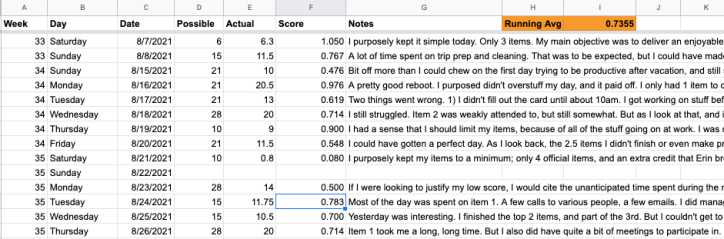 The Daily Scores tab from my own scorekeeping sheet.
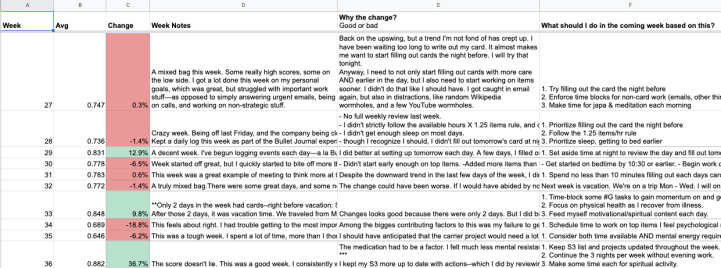
The Weekly Notes tab automatically calculates your score each week, and how it compares to last week. It has columns for three pieces of reflection: notes on the week, why the change from last week, and what to focus on next week. It’s much simpler than a GTD weekly review — more a combination of a journal and a quantitative self-analysis, with a forward-looking plan.
Level 4: Adding the Goals & Projects List
Even at Level 1, importance is central. But how do you figure out what’s important? You can rely on your gut, which is sometimes a good guide. Or you can systematize it.
Level 4 is about tracking your projects, and sorting them into those that serve your goals and those that don’t. Just as getting any old tasks done isn’t a good measure of productivity, neither is getting any old projects done. Getting the right projects done — and the wrong ones off your plate — is what productivity is about.
I keep four major long-term goals at the top of my project list. Reviewing projects each week, I ask which serve those goals and which don’t, marking them #G and #NG. I try to minimize how many #NG projects stay on the list.
My S3 contains primarily items under #G projects. When I fill out my card, the top two items are actions that serve #G projects. My goals dictate what’s important, which dictates what things on my card are worth. So my score each day reflects how much I’m serving my goals. That is the very definition of productivity: spending each day working on your goals.
Once you have a master action list and a project list sorted into #G and #NG, the whole thing fits together like this: